March 19, 2025 Release Notes
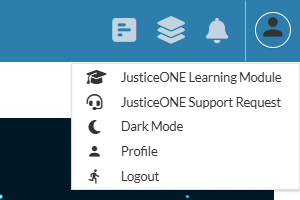
You can find a copy of the release notes in the learning management system after logging into www.justice-one.us . The Learning Management Sytem is located in the top right corner of the screen, just click on the profile icon and select it from the menu option.
Release Notes are located under each product.cateogry. Choose the category (product) and then choose the Course "-Release Notes".
|
|
Highlights from this release:
- Court
- Court Admins can export Financial records
- Court uses can export to Probation
- New optoins for viewing the Court Session Management grid
- Added the ability to Revoke a refund (Void)
- Platform
- Added a new "Learn" button to various screens
- Content will be added to screens to view help from the screen
- Updated the home page to include upcoming training events
- Admin Portal
- Added Audit for records (RMS Admins only)
- Call for Service
- Can now import from GeoConex (Full 911 Business Partner)
- RMS
- Part 1 Crime Statistics Report now includes Human Trafficking
- Supplemental reports can be shared via report/case share option
- E-Ticketing screen was redesigned to continuously scroll instead of tabs
- Added ability for users to set a default font color.
- Mobile RMS
- New setting to allow you to default the GPS location in reports
- Enter a support request from the main screen
- Violators can now sign their ticket electronically
|
|